Detailed Design
This chapter outlines the detailed design choices implemented in the Scalata project, diving into the code-base organisation, the architectural patterns adopted, and the technical decisions that guided development.
The system architecture follows Hexagonal Architecture principles combined with Domain-Driven Design (DDD), ensuring a clear separation between business logic and I/O mechanisms.
Package Structure
The code-base is divided into main packages that mirror the layers of the hexagonal architecture:
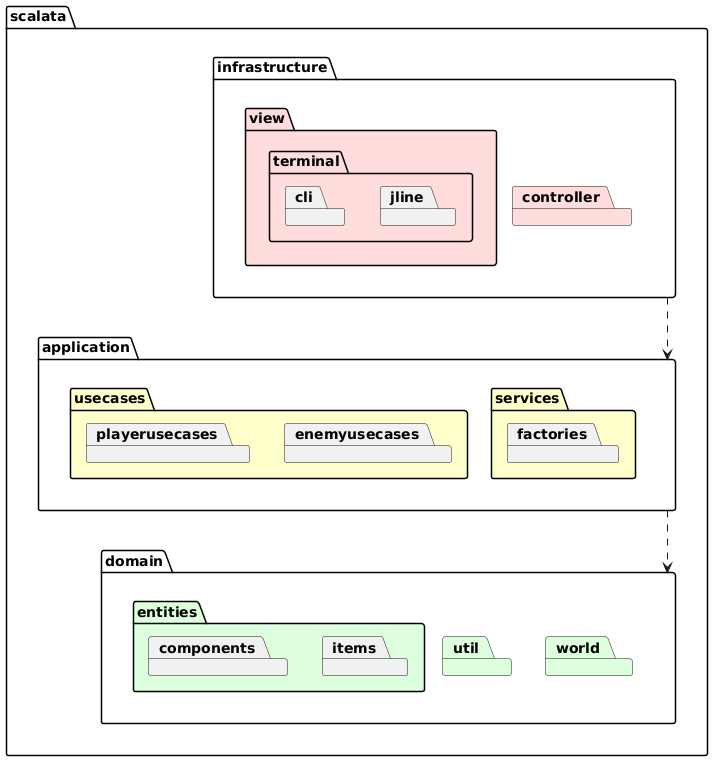
Package Overview
The Scalata project is divided into three concentric layers—domain, application, and infrastructure—mirroring a classic Hexagonal Architecture.
Each layer is further split into sub-packages whose names describe their exact responsibility.
1. scalata.domain
The pure heart of the application—no I/O, no frameworks.
-
entities
Fine-grained objects such as
Player,Enemy,Item.
They expose intentful methods (move,receiveDamage,useItem) that return new instances, never mutating themselves. -
world
Aggregates that group several entities and guarantee invariants:
Room(geometry + occupants),Floor(connected rooms),World(vector of floors), andGameSession(the single source of truth for a running game).
Factory methods in each companion object ensure illegal states are un-representable. -
util
Small, pure utilities—coordinate math (Point2D), cardinal directions, random helpers, validation combinators.
Nothing here imports from any other layer.
2. scalata.application
Pure orchestration and workflow.
-
usecases
Each class models exactly one “verb” from the requirement specification. Examples:
StartGameseeds the first world,MovePlayerapplies a direction and updates combat checks,EnemyTurnasks the AI for moves and updates the world accordingly.
All logic remains side-effect-free behind an effect typeF[_]; this lets tests swapIOwith a deterministic mock. -
services
Shared control logic that multiple use-cases rely on:
FloorGeneratorbuilds deterministic levels from a seed;GamePhaseServiceruns the finite-state machine for Menu → Playing → Game Over;EnemyAIwraps the Prolog engine and transforms game state into AI decisions. -
ports
Pure traits that define both inbound (“driven”) and outbound (“driving”) interfaces.
Example:trait GameView[F[_], I]: def display[A](text: A): F[Unit] def getInput: F[I] def displayError[A](message: A): F[Unit] def clearScreen: F[Unit]The application layer depends only on these abstractions, never on concrete I/O.
3. scalata.infrastructure
Everything that touches the outside world.
-
controller
Translates user input into domain operations.GameControllerpulls commands from aGameView, invokes the right use-case, and feeds the updated session back to the view.MenuControllerdoes the same for start-up menus. -
view
Concrete UIs that implementGameView:ConsoleView—ANSI terminal rendering with colourful ASCII art.TestView—headless stub that returns scripted input for unit tests.- Future GUI adapters can be added here without touching the rest of the code-base.
How the Layers Interact
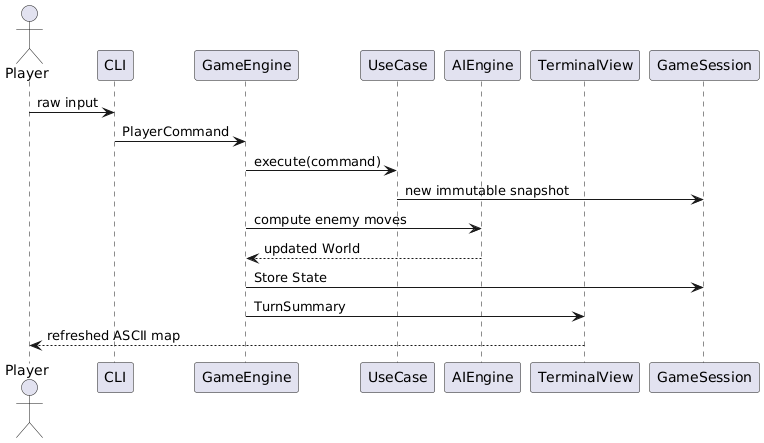
- Infrastructure receives an event (key press).
- A controller maps the event to a use-case call.
- The use-case pulls & updates domain objects, possibly invoking an application service.
- The modified, pure
GameSessionis returned to the controller. - The view renders the new state.
Because dependencies flow strictly inwards, you can replace any outer package (e.g., swap ConsoleView for a GUI) without recompiling the core layers.
Architectural Patterns
Hexagonal Architecture with Domain-Driven Design (DDD)
Hexagonal Architecture (also called Ports & Adapters) and DDD complement each other, giving a project like Scalata a clear, test-friendly structure.
1 Core idea
- Place business concepts (the Domain) at the centre.
- Wrap them with an Application layer that orchestrates use-cases without knowing how I/O happens.
- Connect the outside world (UI, databases, Prolog engine, files, network, etc.) through thin Infrastructure adapters that implement or drive the ports declared in the Application layer.
2 Dependency rules
- Only inward references: infrastructure → application → domain (never the opposite).
- Domain has no dependency on external libraries except for lightweight FP datatypes; it exposes intent-rich methods (
attack,pickUp,move) instead of setters. - Application depends on the Domain but talks to Infrastructure only via abstract ports (
GameView). - Infrastructure is free to rely on any technology stack (Cats-Effect, tuProlog, JSON, Swing); changing or replacing it never ripples back into core logic.
3 Benefits in practice
| Aspect | Why it helps | Example in Scalata |
|---|---|---|
| Isolation & testing | Domain and Application layers are pure; they can be unit- or property-tested without running the console, AI, or file system. | EnemyMovementUseCase is tested with a TestView stub; no ANSI rendering is involved. |
| Pluggable interfaces | A new presentation layer (e.g., GUI, web) is a single adapter implementing GameView; no other code changes. | Swap ConsoleView with a future ScalaFX view by wiring it in Main.scala. |
| Safe evolution | Outer-layer refactors cannot break domain invariants because dependencies are one-way. | Prolog engine can be replaced by an A* path-finder written in Scala without touching Enemy. |
| Clear ownership | Each concern has a unique home—business rules in Domain, workflows in Application, devices in Infrastructure. | Inventory capacity logic lives in Player. |
| Tech agnosticism | Core stays independent from frameworks, keeping compile times low and portability high. | Domain compiles on Scala JVM, ScalaJS, or Native if desired. |
4 Typical workflow of a game turn
Entities
The following section details the static entities.
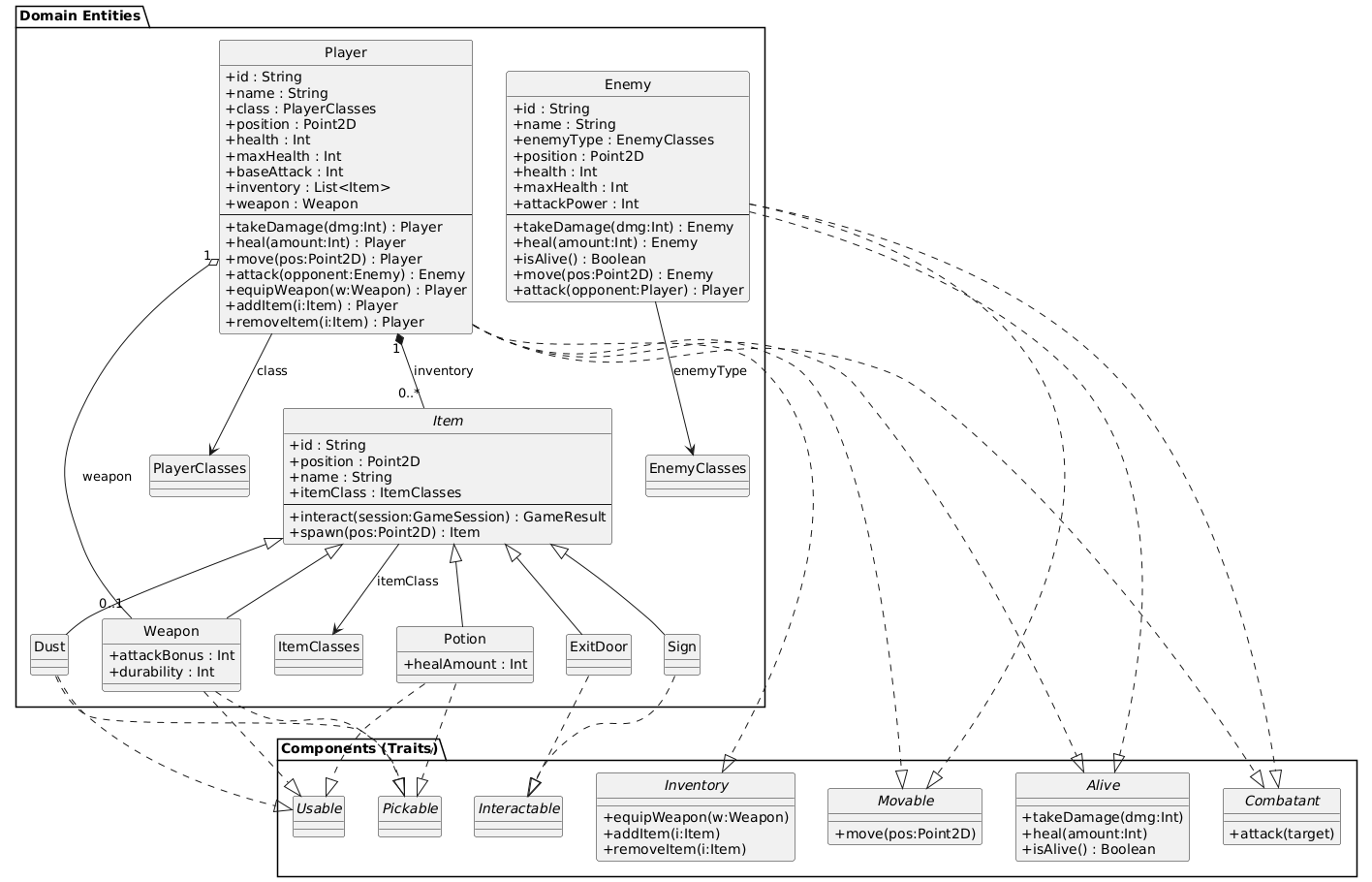
1.1 Enemy
A hostile creature driven by the AI.
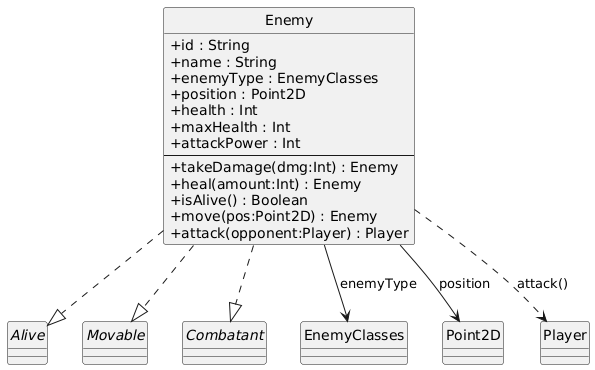
Behavioural mix-ins
- Alive –
takeDamage,heal,isAlive - Movable –
move(newPos) - Combatant –
attack(target: Player)
1.2 Player
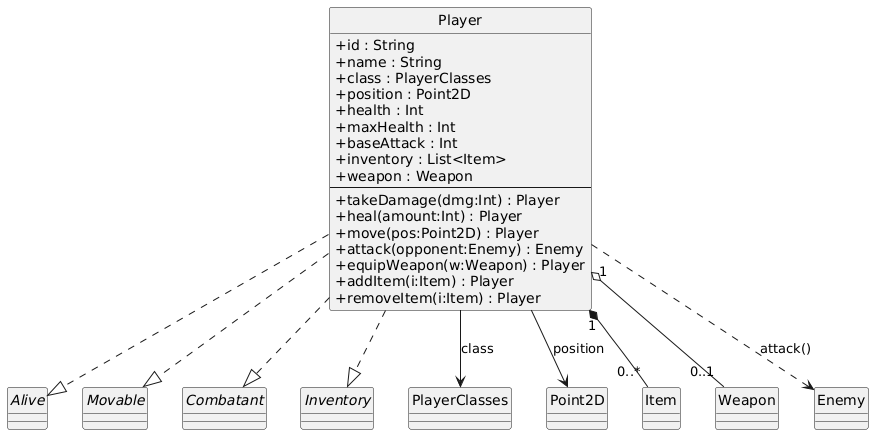
Embodies the user-controlled hero and owns an inventory.
Behavioural mix-ins
- Alive – HP management
- Movable – Spatial translation
- Combatant –
attack(opponent: Enemy) - Inventory – item handling (
equipWeapon,addItem, …)
1.3 Item Hierarchy
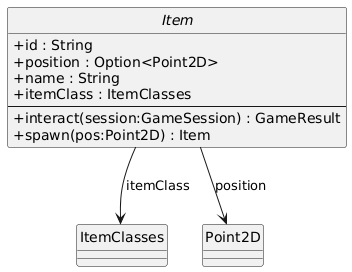
All pickable or interactable objects inherit from the abstract Item.
| «trait» Item | |
|---|---|
| id : String | Persistent identifier |
| position : Option | Some(p) when on floor, None once picked |
| name : String | Label shown to the player |
| itemClass : ItemClasses | Functional grouping (Weapon, Potion, …) |
| interact(session) : GameResult | Context action (e.g., pick up) |
| spawn(pos) : Item | Copy of the item at a new position |
1.3.1 Weapon
Interactions
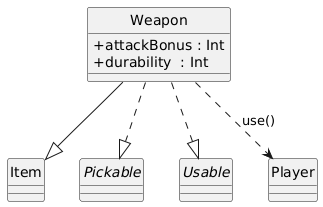
– Pickable: transferred to inventory – Usable: equips itself and removes from bag
1.3.2 Potion
Interactions
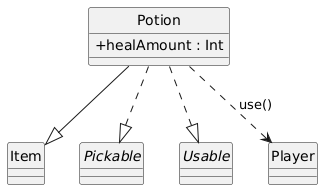
– Pickable → inventory – Usable → heals the owner, then destroys itself
1.3.3 Dust
Flavour collectible with no gameplay effect; still pickable for achievements.
1.3.4 Sign
Displays the current tower level without mutating the world state.
1.3.5 ExitDoor
Moves the player to the next floor and increments GameState.currentLevel on success.
2 Cross-cutting Capabilities (Traits)
| Capability | Purpose | Key Methods |
|---|---|---|
| Alive | Life-cycle management | takeDamage, heal, isAlive |
| Movable | Position updates | move(newPos) |
| Combatant | Fighting interface | attack(target) |
| Inventory | Item storage & equipment | equipWeapon, addItem, removeItem |
| Interactable | World interaction hook | interact(session) |
| Pickable | Collect item from floor | pick(item, session) |
| Usable | Contextual use of an item | use(item, owner) with given instances for Potion, Weapon, Dust |
These traits are orthogonal; concrete entities mix only the capabilities they need, keeping the model lean and extensible.
3 Design Principles Adopted
- Immutability first – every state change returns a fresh value object; no in-place mutation.
- Type-class architecture – separates data (case classes) from behaviour (traits), promoting reuse and testability.
- Compile-time safety – enumerations and generic constraints prevent invalid combinations (e.g., a non-pickable Sign cannot be mis-used).
View
The view package renders the game on a text console and gathers user input while remaining UI-technology agnostic.
It is split into three concentric circles:
- UI-independent interface (
GameView) - UI-specific adaptors (
ConsoleView,JLineView) - High-level screens (
MenuView,GameRunView, …) that orchestrate banner creation and input parsing.
1 Core Abstractions
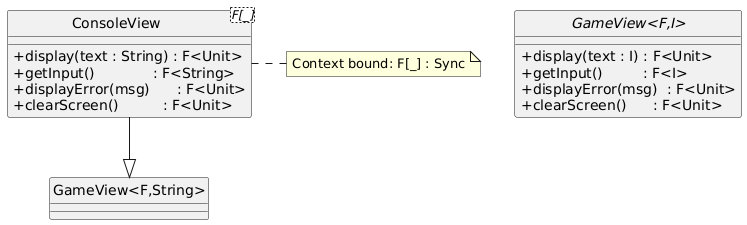
1.1 GameView[F, I]
A polymorphic interface that lifts all I/O operations into any effect F supporting cats.effect.Sync:
| Operation | Purpose |
|---|---|
display[A](text: A) | Write arbitrary content |
getInput | Read a line (blocking) |
displayError[A](msg: A) | Highlight invalid input |
clearScreen | full refresh |
GameView is the sole contract known by upper layers (controllers). Everything below it can change without ripple effects.
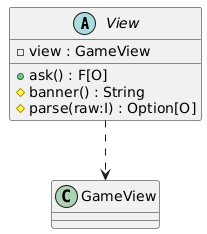
1.2 View
A template that factors common logic for interactive screens:
- Banner generation (
bannerval) - Raw-to-domain parsing (
parse) - Loop that re-asks until parsing succeeds (
Shared.run)
It is parameterised on:
V = concrete subclass
I = raw input
O = domain output
E = error type shown to the user
F = effect
2 Low-Level I/O Adaptors
| Class | Technology | Responsibilities |
|---|---|---|
ConsoleView[F] | StdIn / StdOut | Implements GameView with plain Scala I/O and ANSI clear-screen. |
JLineView[F] | JLine v3 | Rich terminal (non-blocking reader, key echo control). |
Design highlights
- Both classes bridge the abstract
GameViewinterface: the rest of the codebase stays unchanged when swapping I/O backend. JLineViewguards theTerminalinside aResource, applying the RAII pattern to avoid file-descriptor leaks.
3 Interactive Screens
Every screen subclasses View, specialises banner and parse, and exposes an ask method to its controller.
| Screen | Domain output | Short description |
|---|---|---|
MenuView | Boolean | “Start game? y/n” |
ChampSelectView | PlayerClasses | Choose class (Mage, Barbarian, Assassin) |
GameRunView | PlayerCommand | Main gameplay HUD; prints world map and interprets complex commands |
GameOverView | Boolean | Ask to return to menu |
HelpView | n/a | Static help string |
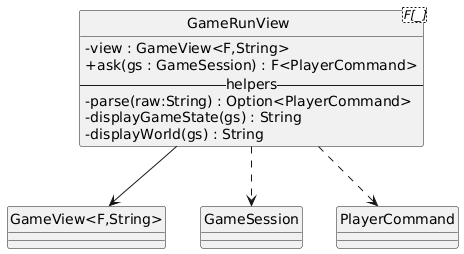
3.1 GameRunView – key points
- Builds an ASCII mini-map from
GameSession, painting rooms, doors, items, player symbol and enemies. - Parses multi-token commands (
"c n","u potion","undo"…) with pattern matching. - Encapsulates rendering helpers (
getCellDisplay,findDoorSymbol, …) for single responsibility.
4 Shared Utilities
4.1 Shared object
- Controller router – returns the
GameControllerState ⇒ Controller[F]map, injecting the chosenviewinstance into every screen. - Generic run-loop – repeatedly queries
GameView.getInputuntilparsesucceeds. - Helper parsers – e.g.,
booleanParse.
5 Command-Line Entry Points
CliApp– Bootstrap withConsoleView, then hand control toGameEngine.gameLoop.JLineApp– Same, but wrapsJLineViewin aResourceto guarantee terminal closure.
6 Interaction Workflow
- App constructs a concrete
GameViewimplementation. - It passes that instance to
Shared.getControllersMap, wiring every controller to its corresponding screen (Viewsubclass). GameEnginedrives the state machine:- asks the current controller ➞
- controller delegates to its screen’s
ask➞ - screen uses
GameViewto render banners and read input.
- On shutdown, resources (JLine terminal) are released automatically.
7 Design Principles Applied
- Bridge pattern – separates what the game wants to display (
GameView) from how it is displayed (ConsoleView,JLineView). - Template Method –
Viewfixes the input loop while letting subclasses customise banner and parsing. - Dependency Injection – every screen receives a
GameViewin its constructor, enabling pure unit testing with mocks. - Functional purity – all public methods remain referentially transparent; side effects live inside the
Fcontext.